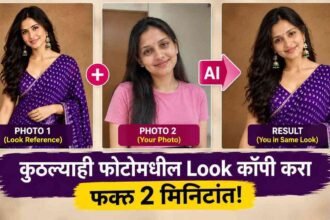
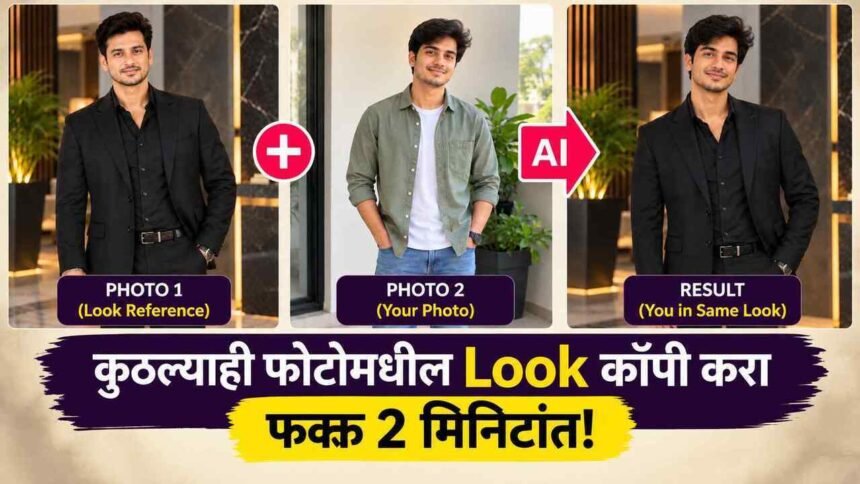
Boys Look Copy Prompt: : कधी इन्स्टाग्राम किंवा पिंटरेस्टवर एखाद्या दाक्षिणात्य हिरोचा किंवा टॉप मॉडेलचा फोटो पाहून “असा भारी आउटफिट, अशी कडक पोझ आणि असा भारी फोटो लुक माझ्या फोटोला मिळाला तर?” असा विचार तुमच्या मनात आलाय का?
नेहमीच्या एडिटिंग ॲप्समध्ये असा हुबेहूब लूक मिळवणे अशक्य असायचे. पण आता कृत्रिम बुद्धिमत्ता (AI) तंत्रज्ञान इतके पुढे गेले आहे की, तुम्ही घरबसल्या मोबाईलवरून फक्त दोन फोटो वापरून समोरच्याचा संपूर्ण लूक स्वतःच्या फोटोवर कॉपी करू शकता!
📢 एआय संबंधित नवीन आणि उपयोगी माहितीसाठी Ai Shikshan ला Google वर प्राधान्य असलेले स्रोत मध्ये जोडा.
या भन्नाट ट्रिकसाठी तुम्हाला कोणतेही महागडे सॉफ्टवेअर शिकण्याची गरज नाही. तुमच्याकडे फक्त खालील दोन फोटो असावे लागतील:
PHOTO 1: ज्या फोटोमधील कपडे, पोझ आणि बॅकग्राउंड (लुक) तुम्हाला हवा आहे.
PHOTO 2: तुमचा स्वतःचा साधा, स्पष्ट चेहरा असलेला फोटो.
यानंतर खाली दिलेला मास्टर Prompt कॉपी-पेस्ट करायचा आहे. चला तर मग जाणून घेऊया ही भन्नाट ट्रिक कशी काम करते!
हा AI Prompt नेमका काय करतो?
सर्वसाधारण एआय टूल्स तुमचा चेहरा पूर्णपणे बदलून टाकतात, ज्यामुळे फोटो कृत्रिम वाटतो. पण या प्रॉम्टमध्ये आम्ही दोन्ही फोटोची भूमिका अगदी स्पष्ट आणि वेगळी ठेवली आहे:
1. PHOTO 1 (Visual Blueprint): एआय या फोटोमधून फक्त लूक घेईल. म्हणजेच तुमचे आउटफिट (कपडे), पोझ (उभे राहण्याची पद्धत), Accessories (चष्मा, घड्याळ), Background (बॅकग्राउंड), Lighting आणि Camera Angle या गोष्टी रिक्रिएट केल्या जातील.
2. PHOTO 2 (Identity Source): हा तुमचा आधार असेल. एआय तुमचा ओरिजिनल Face (चेहरा), Body, Skin Tone, Hairstyle, Beard (दाढी) आणि Moustache (मिशा) जशाच्या तशा ठेवेल.
सोप्या भाषेत सांगायचे तर: फोटो 1 मधून फक्त ‘लूक’ घेतला जाईल आणि फोटो 2 मधून ‘तुम्ही’!
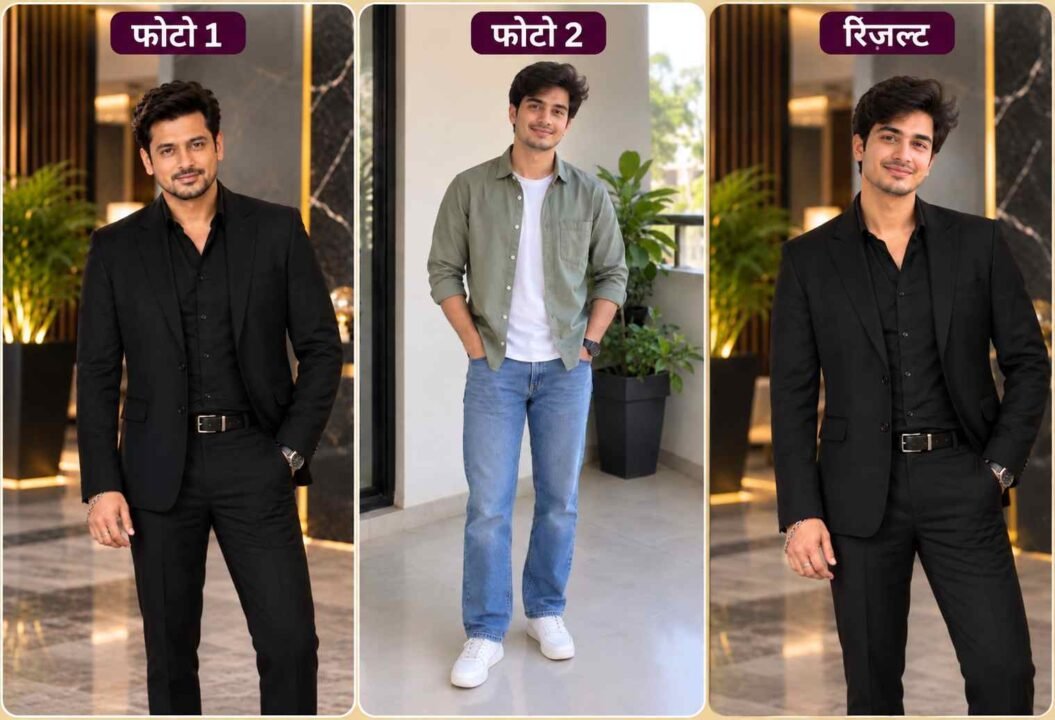
प्रॉम्ट वापरण्यासाठी दोन फोटो कसे निवडायचे?
परफेक्ट रिझल्ट मिळवण्यासाठी फोटो निवडताना खालील गोष्टींची काळजी घ्या:
PHOTO 1 — लूक / व्हिज्युअल रेफरन्स (Look Reference)
तुम्हाला ज्या मुलाचा, हिरोचा किंवा मॉडेलचा लूक आवडला आहे तो फोटो निवडा.
PHOTO 2 — तुमचा स्वतःचा फोटो (Your Photo)
तुमचा चेहरा स्पष्ट दिसणारा एक चांगला हाय-क्वालिटी फोटो निवडा.
100% लूक कॉपी करण्यासाठी ‘ही’ महत्त्वाची गोष्ट लक्षात ठेवा
एआय (AI) इमेज जनरेशनमध्ये १००% गॅरंटी नसली, तरी एक युक्ती वापरल्यास कमालीचा रिझल्ट मिळतो. PHOTO 1 आणि PHOTO 2 मधील कॅमेरा अँगल सारखा ठेवण्याचा प्रयत्न करा. जर रेफरन्स फोटोमध्ये मुलगा समोर पाहत उभा असेल, तर तुमचा स्वतःचा फोटोही समोर पाहणाराच अपलोड करा.
हा Prompt कसा वापरायचा?
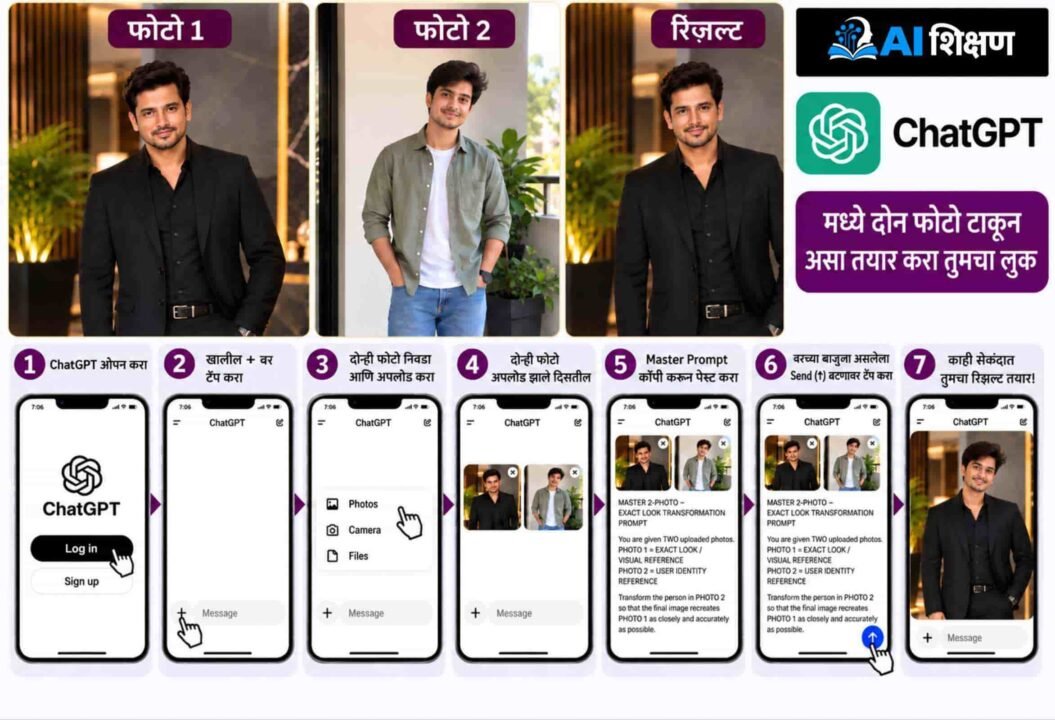
प्रॉम्ट कॉपी करा > ChatGPT मध्ये जा > फोटो 1 अपलोड करा > फोटो 2 अपलोड करा > हा Master Prompt पेस्ट करा > Generate बटणावर क्लिक करा!
हेही वाचा: Girls Look Copy Prompt: मुलींसाठी कुठल्याही फोटोमधील लुक कॉपी करा फक्त 2 मिनिटांत! वापरा हा Master AI Prompt.
हा Prompt तुम्ही कोणत्या लुक्ससाठी वापरू शकता?
हा एक ऑल-इन-वन प्रॉम्ट आहे. तुम्ही कोणत्याही प्रकारच्या लूकसाठी हा वापरून पाहू शकता:
Hero / Actor Inspired Look: साऊथ किंवा बॉलिवूड अभिनेत्याच्या गाण्यांमधील किंवा सिनेमातील डॅशिंग लूक स्वतःवर ट्राय करण्यासाठी.
Traditional Look: सण-उत्सवांसाठी कुर्ता, शेरवानी किंवा जोधपुरी सूट घालू इच्छित असल्यास.
Wedding & Formal Look: लग्नासाठी किंवा ऑफिस मीटिंगसाठी महागडा कोट-ब्लेझर, थ्री-पीस सूट तुमच्यावर कसा दिसेल हे पाहण्यासाठी.
Casual & Premium Editorial Look: ब्रँडेड टी-शर्ट, जॅकेट, जीन्स आणि स्टायलिश स्ट्रीट फोटोग्राफी लूकसाठी.
रिझल्ट परफेक्ट आला नाही तर काय करायचे?
कधी कधी एआय फोटो बनवताना काही चुका करू शकते. अशा वेळी घाबरून न जाता खालील गोष्टी तपासा:
1. तुमचा स्वतःचा फोटो (फोटो 2) खूप जुना किंवा कमी प्रकाशातील नाही ना? असल्यास दुसरा फोटो अपलोड करा.
2. रेफरन्स फोटोमधील कपडे आणि बॅकग्राउंड क्लिअर आहेत ना?
3. कॅमेरा अँगलमध्ये खूप जास्त फरक असल्यास, दोन्ही फोटो समोर बघणारे निवडा आणि पुन्हा प्रॉम्ट रन करा.
शेवटी तुम्हाला काय मिळणार?
या प्रॉम्टचा मॅजिक फॉर्म्युला अगदी सोपा आहे:
तुमचा चेहरा + तुमची दाढी-मिशा + तुमची हेअरस्टाईल + सामोरच्याचे कपडे + त्याची पोझ + भारी बॅकग्राउंड = तुमचा कडक नवीन AI Photo!
तर मग वाट कसली पाहताय? आत्ताच तुमचा आवडता लूक शोधा, हा प्रॉम्ट वापरा आणि तुमचा नवीन फोटो सोशल मीडियावर शेअर करून मित्रांना चकित करा!
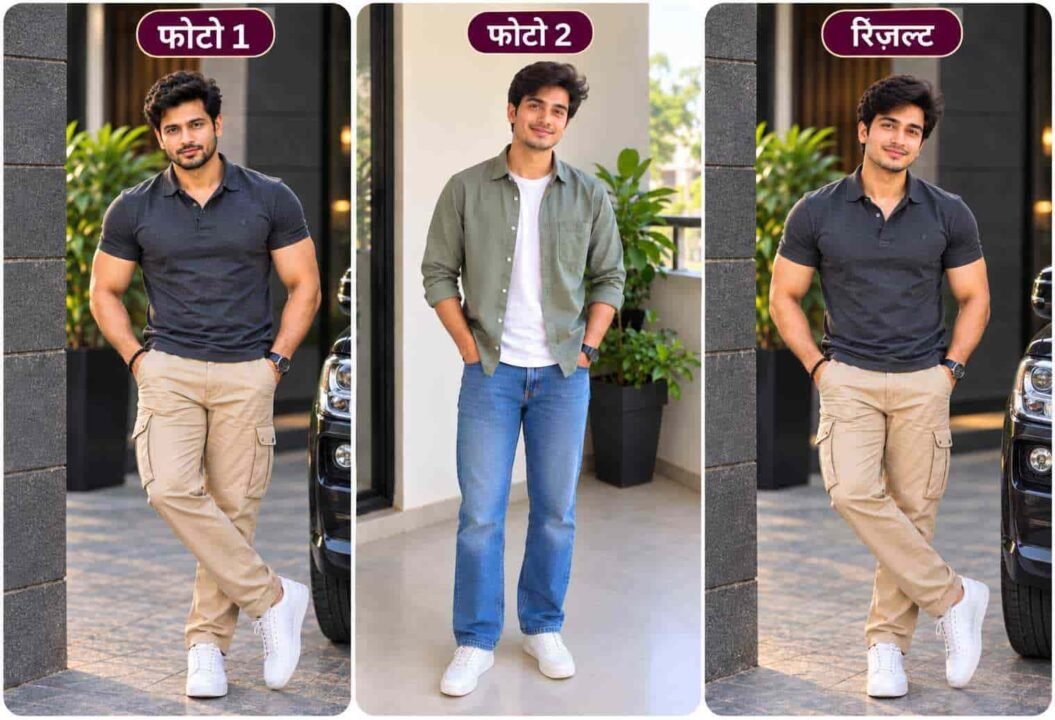
हा Prompt वापरून तुमच्या फोटोला आवडलेल्या फोटो चा आउटफिट , पोझ आणि फोटोग्राफी लुक देऊन नवीन Photo तयार करून पाहा. तुमच्या मित्रांसोबत हे पेज नक्की शेअर करा, जेणेकरून तेही त्यांच्या आवडत्या फोटोचा लुक स्वतःच्या फोटोवर ट्राय करू शकतील. अशाच उपयोगी AI Prompts, Photo Editing Tricks आणि नवीन AI अपडेट्ससाठी Ai Shikshan (aishikshan.in) चे WhatsApp Channel Follow करा.
हा ‘Master AI Prompt’ वापरा
खाली दिलेला प्रॉम्ट जसाच्या तसा कॉपी करा. हा प्रॉम्ट ChatGPT मध्ये उत्तम काम करतो. यामध्ये कोणतीही ओळ कमी करू नका, कारण प्रत्येक ओळ तुमची ओळख सुरक्षित ठेवण्यासाठी महत्त्वाची आहे.
[MASTER 2-PHOTO — EXACT LOOK TRANSFORMATION PROMPT FOR BOYS]
MASTER 2-PHOTO — EXACT LOOK TRANSFORMATION PROMPT FOR BOYS / MEN

You are given TWO uploaded photos.

PHOTO 1 = EXACT LOOK / VISUAL REFERENCE
PHOTO 2 = USER IDENTITY REFERENCE

Transform the person in PHOTO 2 so that the final image recreates PHOTO 1 as closely and accurately as possible.

The final image should look like PHOTO 1 has been recreated using the person from PHOTO 2.

━━━━━━━━━━━━━━━━━━━━

IMPORTANT CORE RULE

━━━━━━━━━━━━━━━━━━━━

PHOTO 1 determines HOW the final photograph looks.

PHOTO 2 determines WHO the person is.

Therefore:

PHOTO 1 = VISUAL BLUEPRINT
PHOTO 2 = PERSON / IDENTITY

Transfer the permitted visual elements of PHOTO 1 onto the person from PHOTO 2 while preserving the user's complete original identity and grooming.


---

━━━━━━━━━━━━━━━━━━━━

IDENTITY — ABSOLUTE PRIORITY

━━━━━━━━━━━━━━━━━━━━

The person in the final image MUST remain the same person from PHOTO 2.

Use PHOTO 2 as the ONLY identity reference.

Preserve the user's:

• facial identity
• face shape
• facial structure
• facial proportions
• eyes
• eyebrows
• nose
• lips
• cheeks
• jawline
• chin
• forehead
• ears
• skin colour
• skin tone
• natural skin texture
• distinctive facial characteristics
• age appearance
• recognizable facial features
• natural physical identity

The following MUST ALWAYS come from PHOTO 2 and MUST NOT be copied from PHOTO 1:

• Face
• Facial features
• Body / physique
• Body proportions
• Skin colour / skin tone
• Hairstyle
• Hair parting
• Hair direction
• Hair length
• Hair volume
• Hair texture
• Hair colour
• Beard
• Moustache
• Sideburns
• Facial hair pattern
• Facial expression
• Smile / neutral expression
• Eye expression
• Gaze expression

Do NOT use the face of the person in PHOTO 1.

Do NOT face-swap the identity from PHOTO 1.

Do NOT blend the two faces.

Do NOT copy the facial features of PHOTO 1.

Do NOT copy the hairstyle or hair colour from PHOTO 1.

Do NOT copy the beard or moustache from PHOTO 1.

Do NOT copy the facial expression from PHOTO 1.

Do NOT turn the user into the person shown in PHOTO 1.

The final face, body, grooming and expression must clearly belong to the person from PHOTO 2.


---

━━━━━━━━━━━━━━━━━━━━

EXACT LOOK TRANSFER

━━━━━━━━━━━━━━━━━━━━

Recreate the visual appearance of PHOTO 1 as accurately as possible without transferring the identity-related characteristics listed above.

PHOTO 1 should be treated as the visual blueprint for the final photograph.

Copy the following from PHOTO 1 as closely as possible:

• exact outfit concept
• clothing type
• shirt / T-shirt / kurta / sherwani / suit / blazer / jacket
• clothing colour
• fabric
• texture
• prints
• patterns
• embroidery
• buttons
• collar
• neckline
• sleeves
• cuffs
• layering
• jacket / blazer structure
• trousers / pants / jeans
• footwear
• watch if visible
• sunglasses if visible
• physical accessories
• jewellery if visible
• pose
• posture
• hand position
• arm position
• shoulder position
• head position
• head orientation
• body orientation
• background
• environment
• décor
• lighting
• shadows
• highlights
• colour tone
• depth of field
• background blur
• photographic perspective
• camera angle
• camera distance
• framing
• crop
• subject placement
• overall mood
• overall visual composition
• photography style

IMPORTANT: PHOTO 1 may contain a Hero, Actor, Model or another person.

Do NOT reproduce that person's identity.

Transfer only the permitted visual elements to the person from PHOTO 2.

Do NOT copy any phone, laptop, electronic gadget or other electronic device from PHOTO 1.

Do not create a different interpretation of the reference.

Do not merely create a similar style.

Recreate the actual visual look of PHOTO 1 as closely as possible.


---

━━━━━━━━━━━━━━━━━━━━

POSE — COPY EXACTLY

━━━━━━━━━━━━━━━━━━━━

Copy the pose from PHOTO 1 as closely as possible.

Match:

• standing or sitting position
• body orientation
• shoulder angle
• torso angle
• head angle
• head position
• head tilt
• arm position
• elbow position
• wrist position
• hand placement
• finger positioning where visible
• leg position
• foot position where visible
• posture
• weight distribution
• interaction with clothing
• interaction with surroundings

The final person should appear to be performing the SAME POSE as the person in PHOTO 1.

Do not invent a new pose.

Do not use a generic pose.

Do not simplify the pose.

Recreate the reference pose as accurately as possible while maintaining physically correct human anatomy and the user's natural body proportions from PHOTO 2.

IMPORTANT: Copy the pose only. Do NOT copy the facial expression associated with that pose.


---

━━━━━━━━━━━━━━━━━━━━

FACIAL EXPRESSION — KEEP PHOTO 2

━━━━━━━━━━━━━━━━━━━━

DO NOT COPY THE FACIAL EXPRESSION FROM PHOTO 1.

The final facial expression must remain based on the user's original expression from PHOTO 2.

Preserve:

• original smile or neutral expression
• original mouth position
• original eye expression
• original gaze direction
• original eyebrow position
• natural cheek expression
• natural facial muscle appearance

Do NOT transfer:

• smile from PHOTO 1
• mouth expression from PHOTO 1
• eye expression from PHOTO 1
• eyebrow expression from PHOTO 1
• emotional expression from PHOTO 1
• gaze expression from PHOTO 1

The user's original face and original expression must remain recognizable.

Even when the pose, clothing, background and photography style are copied from PHOTO 1, the facial expression must remain from PHOTO 2.


---

━━━━━━━━━━━━━━━━━━━━

HAIR & GROOMING — KEEP PHOTO 2

━━━━━━━━━━━━━━━━━━━━

The user's original hairstyle and grooming must remain from PHOTO 2.

Preserve:

• original hairstyle
• original hair parting
• original hair direction
• original hair length
• original hair volume
• original hair texture
• original curls / waves / straight texture
• original front hair arrangement
• original side hair arrangement
• original fade / taper
• original fringe if present
• original hair colour
• original beard
• original beard length
• original moustache
• original moustache length
• original sideburns
• original facial hair pattern
• original grooming appearance

PHOTO 1 MUST NOT change the user's hairstyle, hair colour, beard, moustache or facial grooming.

If the user has a beard in PHOTO 2, keep the user's original beard.

If the user has no beard in PHOTO 2, DO NOT add a beard.

If the user has a moustache in PHOTO 2, preserve it.

If the user has no moustache in PHOTO 2, DO NOT add one.

Do not copy the hairstyle or grooming of the person in PHOTO 1.


---

━━━━━━━━━━━━━━━━━━━━

OUTFIT — EXACT RECREATION

━━━━━━━━━━━━━━━━━━━━

Recreate the clothing from PHOTO 1 as closely as possible.

Match:

• exact garment type
• shirt / T-shirt / kurta / sherwani / blazer / suit / jacket
• colour
• material
• fabric appearance
• pattern
• print
• embroidery
• texture
• collar
• neckline
• sleeves
• cuffs
• buttons
• layering
• jacket structure
• blazer structure
• trouser / pants / jeans style
• waistband
• folds
• fitting
• visible clothing details

The clothing should look as if the person from PHOTO 2 is wearing the exact outfit shown in PHOTO 1.

Do not replace the reference outfit with a generic version.

Do not redesign the clothing.


---

━━━━━━━━━━━━━━━━━━━━

ACCESSORIES — COPY EXACTLY

━━━━━━━━━━━━━━━━━━━━

Recreate the visible physical, non-electronic accessories from PHOTO 1.

Match:

• watch
• sunglasses
• bracelet
• ring
• chain
• necklace if visible
• earrings if visible
• belt
• footwear
• bag
• other visible non-electronic accessories
• number of visible accessories
• size
• shape
• design
• colour
• material
• placement

Copy the accessory arrangement from PHOTO 1 as accurately as possible.

DO NOT COPY ELECTRONIC DEVICES

Do NOT copy:

• phone
• laptop
• tablet
• headphones
• earbuds
• camera
• smartwatch or other electronic wearable device
• other electronic gadgets

Do NOT randomly add accessories that are not visible in PHOTO 1.

Do NOT remove clearly visible physical accessories from PHOTO 1.

Do NOT exaggerate accessories.

The physical accessories should look realistic and naturally integrated with the final photograph.


---

━━━━━━━━━━━━━━━━━━━━

BODY & PHYSICAL IDENTITY

━━━━━━━━━━━━━━━━━━━━

The user's physical identity comes from PHOTO 2.

Preserve the user's natural:

• body structure
• body proportions
• build
• shoulder width
• torso proportions
• arm proportions
• leg proportions
• overall physique
• natural physical characteristics

However, reproduce the POSE and CLOTHING FIT from PHOTO 1 as accurately as possible.

If PHOTO 1 shows a different body type, do NOT replace the user's identity with that person's body.

Instead, recreate the same pose and clothing appearance naturally on the user's body.

Never create distorted anatomy.


---

━━━━━━━━━━━━━━━━━━━━

BACKGROUND — EXACT VISUAL MATCH

━━━━━━━━━━━━━━━━━━━━

Recreate the background and environment of PHOTO 1 as closely as possible.

Match:

• location / environment
• architecture
• walls
• doors / windows
• furniture
• plants
• decorations
• non-electronic props
• floor
• background elements
• spatial arrangement
• depth
• lighting environment
• background blur

The final background should visually resemble PHOTO 1, not a generic version of it.

Do not introduce electronic devices from PHOTO 1 into the final image.


---

━━━━━━━━━━━━━━━━━━━━

LIGHTING & PHOTOGRAPHY

━━━━━━━━━━━━━━━━━━━━

Match the photographic characteristics of PHOTO 1.

Recreate:

• light direction
• light softness
• brightness
• highlights
• shadows
• contrast
• colour temperature
• exposure
• depth of field
• background bokeh
• camera perspective
• lens look
• framing
• photographic composition

The final image should look like it was photographed under the same conditions as PHOTO 1, while the person remains the user from PHOTO 2.


---

━━━━━━━━━━━━━━━━━━━━

REALISM — HIGH PRIORITY

━━━━━━━━━━━━━━━━━━━━

Create a highly realistic professional photograph.

Use:

• realistic skin texture
• realistic pores
• natural facial detail
• realistic hair strands
• realistic fabric
• physically accurate accessories
• natural shadows
• realistic reflections
• accurate anatomy
• realistic hands and fingers
• natural proportions
• realistic depth of field

The final image must look like a genuine DSLR / mirrorless photograph.

NOT:

• AI illustration
• 3D render
• CGI
• plastic skin
• synthetic face
• excessive beauty filter
• artificial skin
• distorted anatomy
• unrealistic hands
• fake accessories
• generic AI portrait


---

━━━━━━━━━━━━━━━━━━━━

REFERENCE PRIORITY — FINAL

━━━━━━━━━━━━━━━━━━━━

When there is a conflict between the two photos, use this priority:

1. USER'S IDENTITY — PHOTO 2


2. USER'S FACIAL FEATURES — PHOTO 2


3. USER'S NATURAL BODY IDENTITY — PHOTO 2


4. USER'S SKIN COLOUR / SKIN TONE — PHOTO 2


5. USER'S ORIGINAL HAIRSTYLE — PHOTO 2


6. USER'S ORIGINAL HAIR COLOUR — PHOTO 2


7. USER'S ORIGINAL BEARD & MOUSTACHE — PHOTO 2


8. USER'S ORIGINAL FACIAL EXPRESSION — PHOTO 2


9. EXACT OUTFIT — PHOTO 1


10. EXACT POSE — PHOTO 1


11. EXACT PHYSICAL ACCESSORIES — PHOTO 1


12. EXACT BACKGROUND — PHOTO 1


13. EXACT LIGHTING — PHOTO 1


14. EXACT CAMERA ANGLE & COMPOSITION — PHOTO 1


GADGETS / ELECTRONIC DEVICES — DO NOT COPY

Identity-related characteristics always remain from PHOTO 2.

Visual and scene-related characteristics are transferred from PHOTO 1.


---

━━━━━━━━━━━━━━━━━━━━

FINAL TRANSFORMATION RULE

━━━━━━━━━━━━━━━━━━━━

Think of the transformation as:

PHOTO 1 provides the VISUAL BLUEPRINT.

PHOTO 2 provides the PERSON.

Recreate PHOTO 1 as closely as possible, but replace the person in PHOTO 1 with the exact person from PHOTO 2.

The final result should look like:

> “THE PERSON FROM PHOTO 2, RECREATED IN THE EXACT LOOK, POSE, CLOTHING, PHYSICAL ACCESSORIES, BACKGROUND, LIGHTING AND PHOTOGRAPHIC COMPOSITION OF PHOTO 1, WHILE KEEPING THE ORIGINAL FACE, BODY, SKIN COLOUR, HAIRSTYLE, HAIR COLOUR, BEARD, MOUSTACHE AND FACIAL EXPRESSION FROM PHOTO 2.”


ABSOLUTE RULE

FACE = PHOTO 2
FACIAL FEATURES = PHOTO 2
BODY = PHOTO 2
SKIN COLOUR = PHOTO 2
HAIRSTYLE = PHOTO 2
HAIR COLOUR = PHOTO 2
BEARD = PHOTO 2
MOUSTACHE = PHOTO 2
FACIAL EXPRESSION = PHOTO 2

OUTFIT = PHOTO 1
POSE = PHOTO 1
PHYSICAL ACCESSORIES = PHOTO 1
BACKGROUND = PHOTO 1
LIGHTING = PHOTO 1
CAMERA ANGLE = PHOTO 1
COMPOSITION = PHOTO 1

GADGETS / ELECTRONIC DEVICES = DO NOT COPY

Do not mix the identities.

Do not change who the person is.

Do not copy the face, hair, grooming or expression of PHOTO 1.

Make PHOTO 1 the visual blueprint and PHOTO 2 the identity source.